Focus and ADHD

A timer you cannot lose behind another window

TriggerFlo keeps the running timer on top of everything else, turns a spoken brain dump into a task list, and collapses the whole board down to the one column you are working from. No streaks to break and nothing watching you.

Free forever up to 3 projects. Pro $45.99/yr, or $119 once. Mac, Windows, Linux, iOS, Android.

Six decisions that make the difference

None of these are settings you have to find. They are how the app behaves out of the box, and they are the reason people who bounce off other trackers tend to stay with this one.

The timer does not go behind things

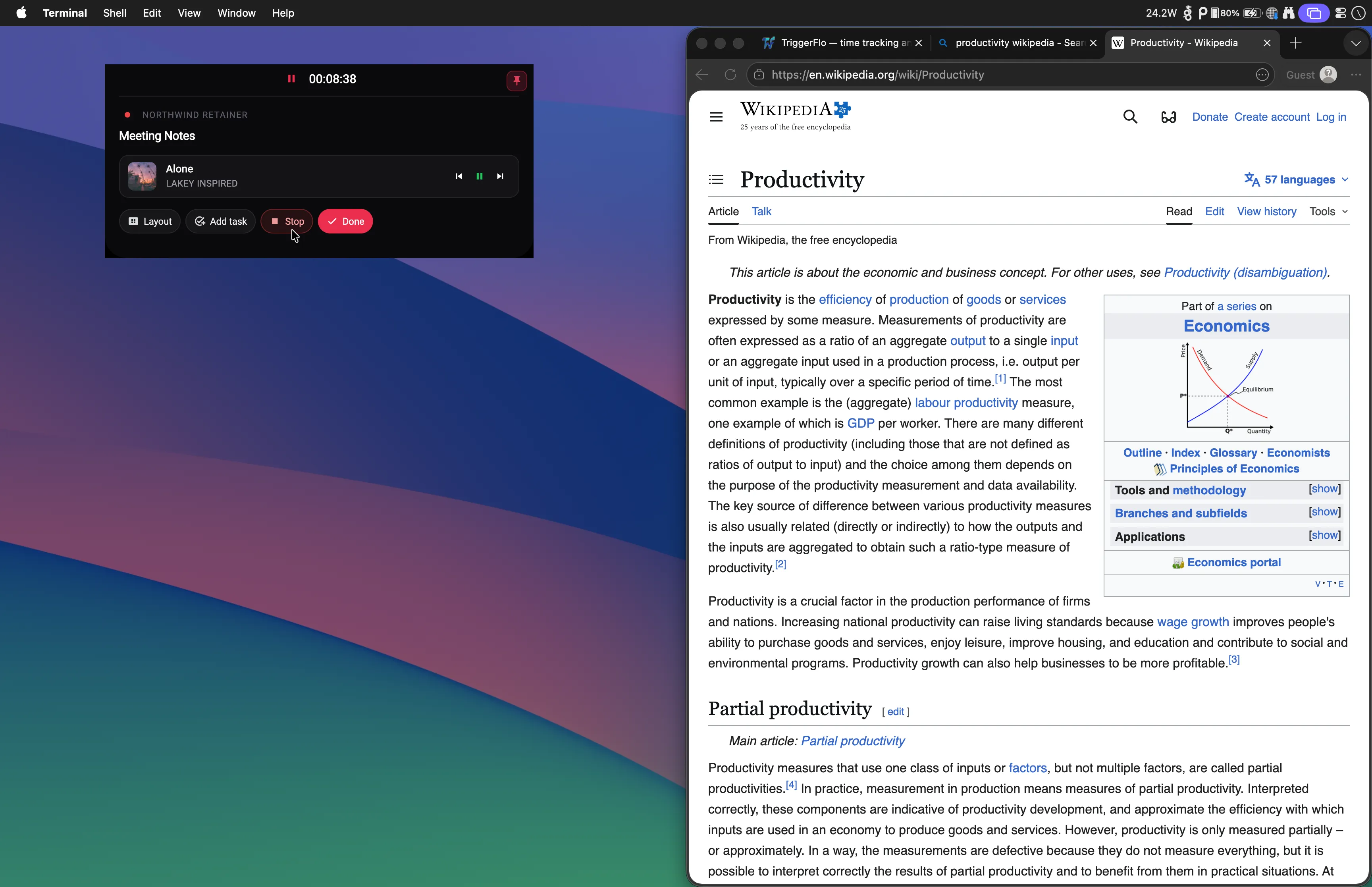
It floats above whatever you are working in — editor, browser, design tool — and on a Mac it can sit in the notch. A timer you have to go looking for is a timer you forget you started.

Say it before you lose it

Hold the mic, talk the way you actually talk, and TriggerFlo turns it into separate tasks. No typing, no form, no deciding which project it belongs to first.

It does not invent deadlines

If you said "next Friday", it writes down "next Friday". The parser is explicitly not allowed to guess a date, so nothing appears on your board claiming a commitment you never made.

One column, full screen

Focus Mode takes a single column and fills the display with it. The other columns are not dimmed or collapsed — they are gone until you come back.

An optional chime, not a streak

A sound at a set interval if you want one. There is no streak to break, no daily goal, and nothing that congratulates you or expresses disappointment.

Nothing is lost by stopping

Stop the timer, switch tasks, come back tomorrow. The record is what you tracked. Missing a day costs you nothing, because nothing is counting consecutive days.

Time passes without announcing itself

Twenty minutes and two hours feel the same from the inside

Most trackers put the timer in a tab. You start it, the window goes behind your editor, and the next time you think about it the number is either alarming or zero because it never started.

TriggerFlo's timer is a separate always-on-top window showing the task you picked and the time so far. On a Mac it can live in the notch, in the space beside the camera that nothing else uses. It is in your eyeline while you work, without taking any of the screen you are working on.

The TriggerFlo floating timer running above another application, showing the current task and elapsed time.
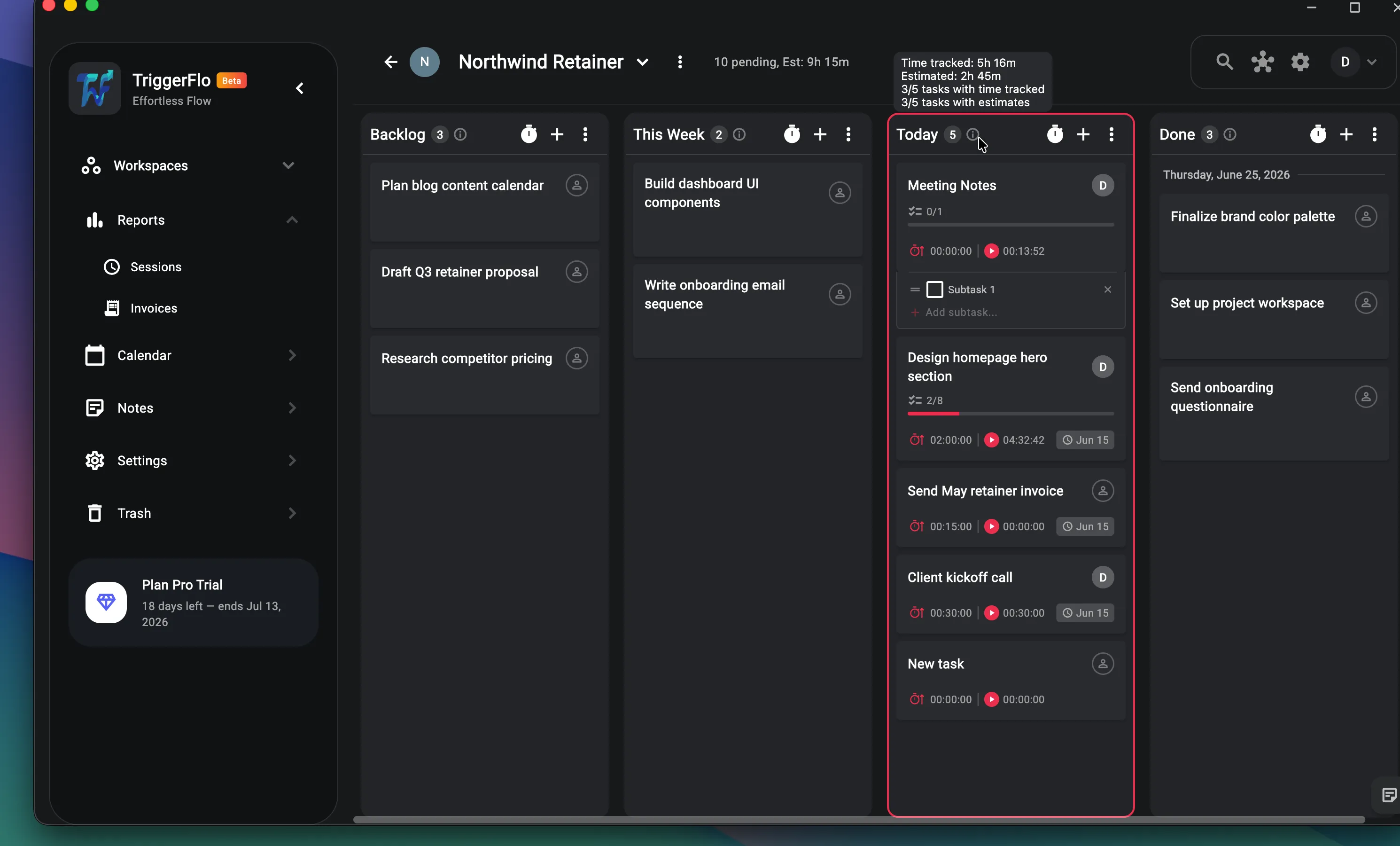
A TriggerFlo project board with tasks arranged in columns.

The gap between deciding and starting

Getting it out of your head, then getting it down to one thing

Capture first. Hold the mic and say the whole tangle out loud — everything you are worried about forgetting, in whatever order it arrives. TriggerFlo splits it into separate tasks. You are not asked to pick a project, a priority or a date before the thought is safely written down, and if you said "sometime next week", that is exactly what it records.

Then reduce. A full board is a list of everything you are not currently doing, which is its own kind of noise. Focus Mode takes one column and fills the screen with it, so what is in front of you is the short list you chose and nothing else.

What this is not

TriggerFlo is a timer and a task board. It is not a treatment for anything, it was not built with clinicians, and it makes no claim about what using it does for you beyond showing you where your time went. Anyone selling you a productivity app as something more than that is selling you something they cannot deliver.

It also does not do several things that genuinely help some people, and it is worth naming them rather than letting you find out after installing. It does not block anything — no site blocker, no app blocker, no lockout. That is downstream of a deliberate decision not to watch which apps and sites you use, so a blocker is not coming. Pair it with Freedom or Cold Turkey if that is the missing piece. It is not body-doubling — there is nobody on the other end. If working alongside another person is what reliably gets you started, Focusmate is the tool for that and a timer is not a substitute for it. It does not enforce a Pomodoro cycle — it counts up, with an optional chime. A strict interval app will do intervals better.

What is left is narrow and we think it is the useful part: the elapsed time is always visible, capture takes one sentence, and the board reduces to one column. If you have bounced off trackers because you forgot they were running, that is the specific problem this is shaped around.
Focus, ADHD and TriggerFlo — common questions

Is TriggerFlo designed specifically for ADHD?

No, and we would be wary of any productivity app that claimed to be. TriggerFlo is a time tracker and task board built so the timer stays visible, capture is fast, and the board can be reduced to one column. Those choices happen to matter a lot to some people and barely at all to others. It is not a treatment, it is not a clinical tool, and it was not built or tested with clinicians.

Does it block distracting websites or apps?

No. TriggerFlo has no blocker and is not going to grow one — it never sees which apps or sites you have open, by design. If blocking is the part you need, use a dedicated blocker like Freedom or Cold Turkey alongside it. They solve a different problem and the two do not conflict.

Is there a Pomodoro timer?

Not a strict one. TriggerFlo counts up against the task you picked, and there is an optional chime at a set interval. If a rigid 25-on/5-off cycle with enforced breaks is what works for you, a dedicated Pomodoro app will do it better.

What happens if I forget to start the timer?

You can edit the entry afterwards. This is the honest weak spot of any tracker that only knows what you told it: TriggerFlo answers it with a timer that is hard to lose behind other windows, not with software that watches you in case you forgot.

Will it nag me?

Only where you asked it to. Reminders fire for tasks you set a reminder on, and the focus chime is off unless you turn it on. There are no engagement notifications, no streaks, and nothing that tells you how you did this week unless you open the reports yourself.

How much of this is free?

The floating timer, Focus Mode, the Kanban board, reports and up to 3 projects are on the free plan, with 15 voice captures a month. Voice capture becomes unlimited on Pro. No credit card to start, and your data exports to CSV whenever you want it back.

Try it for a week and look at the reports

Free up to 3 projects, no credit card, and everything exports to CSV whenever you want it back.

Get release notes in your inbox

New features and fixes as they ship on desktop and mobile. No spam, unsubscribe any time.