Comparison · TriggerFlo vs Clockify

A Clockify alternative for the person doing the work

Clockify is built for administering a workforce — timesheets, approvals, GPS, kiosks. TriggerFlo is built for the person tracking their own day: a Kanban board and a floating timer in one native app, no per-seat meter, no surveillance features.

Free forever up to 3 projects. Pro $45.99/yr, or $119 once. Mac, Windows, Linux, iOS, Android.

The short version

Per seat

Clockify bills $3.99–$11.99 per user per month. TriggerFlo Pro is a flat $45.99 a year, or $119 once.

2 apps

Clockify for time, Plaky for boards, wired together by an integration. TriggerFlo is one app.

No GPS

No location trail, no screenshots, no idle policing. If you are choosing for yourself, that absence is the point.

What each one costs as you grow

Clockify’s price is per person per month, so it scales with headcount. TriggerFlo Pro is one price for your account. Here is Clockify’s annual-billing ladder, per user per month.

Clockify Free

$0.00 /user/mo

Up to 5 users

Clockify Basic

$3.99 /user/mo

Billed annually

Clockify Standard

$5.49 /user/mo

Billed annually

Clockify Pro

$7.99 /user/mo

Billed annually

TriggerFlo Pro

$45.99 /yr

Or $119 once, forever

TriggerFlo vs Clockify, feature by feature

The best-known free time tracker, aimed at teams that need timesheets, approvals, and workforce reporting — part of the CAKE.com suite alongside Plaky and Pumble.

Price for one person, year one

TriggerFlo
Yes. $45.99/yr, or $119 once for lifetime
Clockify
Partly. $47.88/yr on Basic, $65.88/yr on Standard (annual)

Free plan

TriggerFlo
Yes. Free forever, up to 3 projects
Clockify
Yes. Free, up to 5 users

One-time purchase option

TriggerFlo
Yes. Lifetime license, $119
Clockify
No. Subscription only

Kanban board in the same app

TriggerFlo
Yes. Board and timer are one product
Clockify
No. Boards live in Plaky, a separate CAKE.com product

Always-on-top floating timer

TriggerFlo
Yes. Four layouts, stays above other windows
Clockify
Partly. Desktop app with a compact timer window

Native Linux desktop app

TriggerFlo
Yes. .deb and .tar.gz, x86_64 and ARM64
Clockify
Yes. Linux desktop app available

Invoicing

TriggerFlo
Yes. Included with Pro at $5.99/mo
Clockify
Partly. Paid plans only

CSV / Excel export

TriggerFlo
Yes. Free plan included
Clockify
Partly. Moved behind paid plans in 2026

Smartwatch app

TriggerFlo
Yes. Apple Watch and Wear OS
Clockify
Partly. Mobile and kiosk apps

Timesheet approvals, time off, expenses

TriggerFlo
No. Not built — TriggerFlo is not a workforce tool
Clockify
Yes. Core strength, on paid plans

GPS tracking and employee monitoring

TriggerFlo
No. Deliberately not built
Clockify
Yes. Available on paid plans

Difference 1

The board is a different product

Clockify tracks time. Kanban boards live in Plaky — a separate CAKE.com app, a separate subscription, joined to Clockify by an integration you configure. TriggerFlo puts them in the same window: drag a card, hit start, and the time lands on the card. Nothing to connect, nothing to keep in sync.
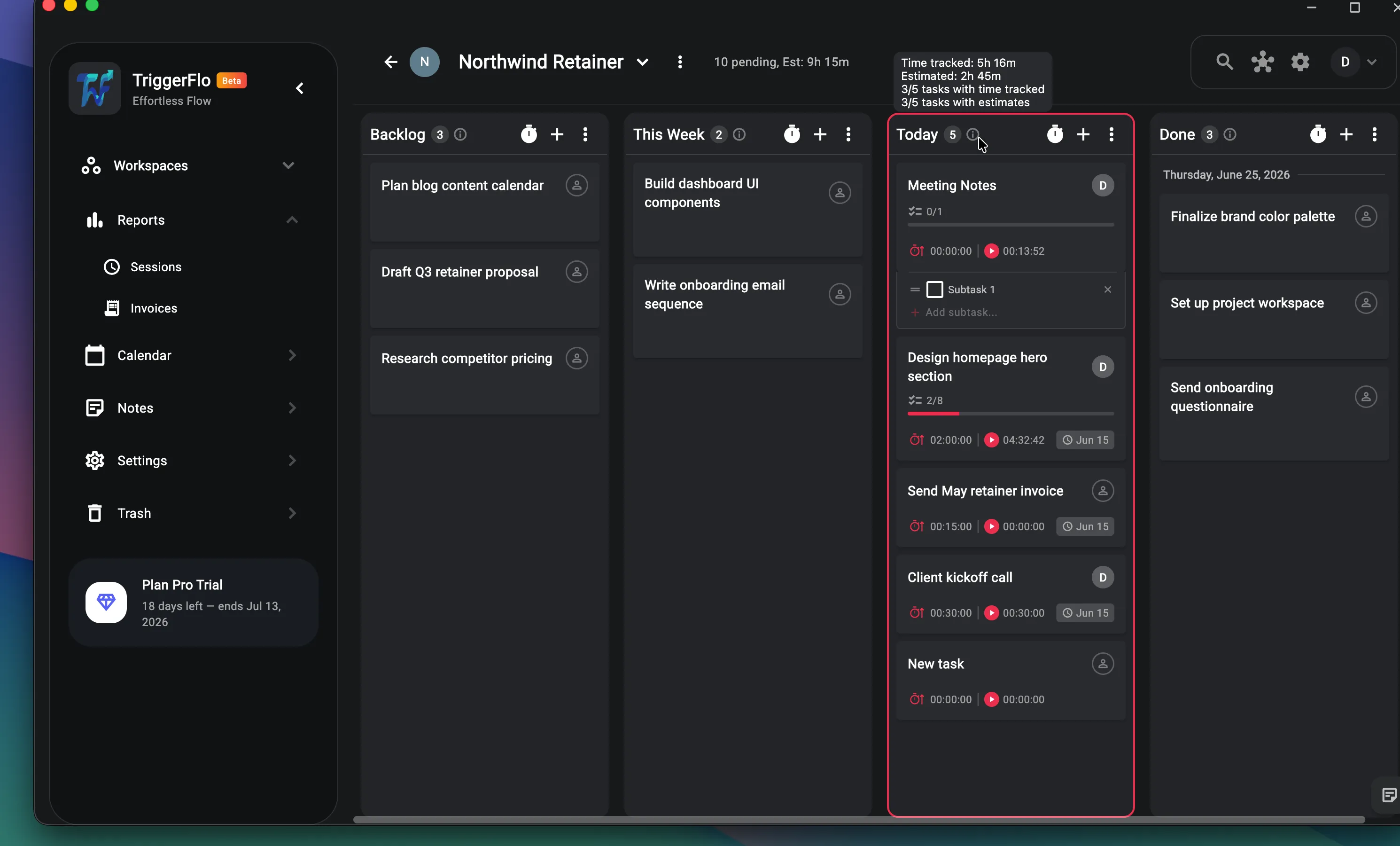
TriggerFlo project board with cards showing estimates, tracked time and subtask progress.

Difference 2

Invoices without climbing a pricing tier

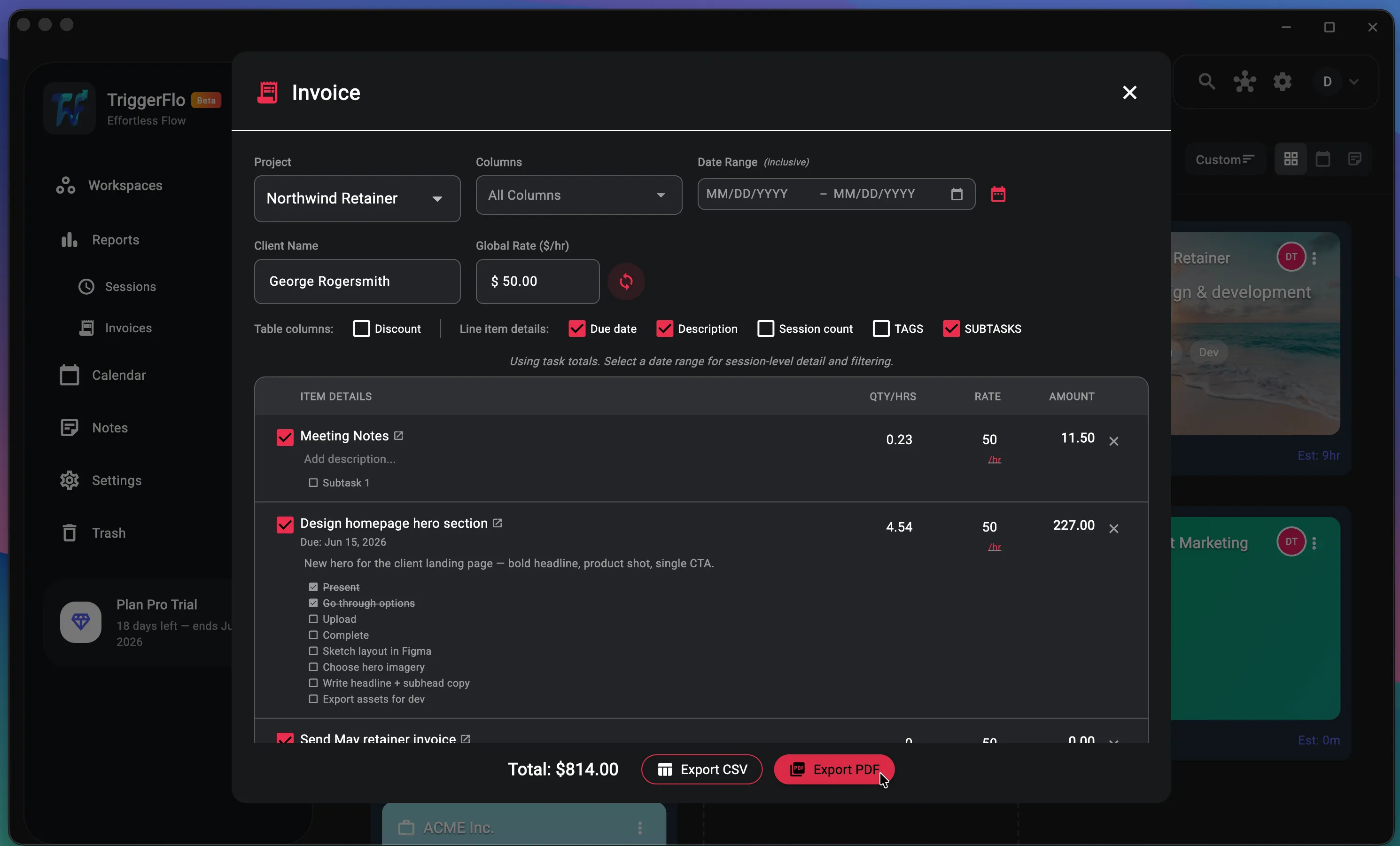
Clockify keeps invoicing on paid plans, and in 2026 moved CSV and Excel export, billable rates and bulk edit off the free plan too. TriggerFlo includes export on the free plan and invoicing on Pro at $5.99 a month — pick a project, a client and a rate, and the line items come from hours you actually tracked.

TriggerFlo invoice builder listing tracked tasks with hours, rates and amounts, with PDF and CSV export.

Which one should you actually pick?

Clockify is a good product. Here is the honest split — the cases where it is the right call, and the cases where TriggerFlo is.

Choose Clockify if…

  • You are running a workforce, not your own day

    Timesheet approvals, time-off requests, expenses, scheduling, forecasting, GPS and kiosk mode — Clockify covers the administrative surface of employing people who track hours. TriggerFlo builds none of that and is not trying to.

  • You need to onboard a lot of people cheaply

    At $3.99 per user per month on annual billing, Clockify Basic is inexpensive at scale and everyone gets the same interface. TriggerFlo’s dedicated team plans are still in progress.

  • You already use Plaky and Pumble

    The CAKE.com bundle puts project boards, chat and tracking on one bill at $12.99 per user per month. If you want that whole suite, buying it as a suite makes sense.

Choose TriggerFlo if…

  • One app instead of two

    Clockify tracks time; the Kanban board is Plaky, a separate product with a separate subscription, wired together by an integration. TriggerFlo puts the board and the timer in the same window — every card shows its estimate against its tracked time without an integration in between.

  • The free plan keeps its exports

    Clockify moved CSV and Excel export, billable rates and bulk edit behind paid plans in 2026. TriggerFlo’s free plan still exports your data, because your data is yours whether or not you pay us.

  • No surveillance features

    There is no GPS trail, no screenshot capture, no idle-time policing in TriggerFlo. If you are choosing a tracker for yourself rather than for someone else, that absence is a feature.

  • Buy it once

    $119 for a lifetime license, updates included. Clockify has no equivalent — the meter runs as long as you use it.

TriggerFlo vs Clockify — common questions

Clockify has a free plan. Why pay for TriggerFlo?

You may not need to — TriggerFlo’s free plan covers unlimited time tracking on up to 3 projects, with reports and export included. Pay when you want unlimited projects, invoices, or public boards. The more interesting comparison is what the free plans include: Clockify moved CSV/Excel export and billable rates to paid tiers in 2026, and its free plan now caps at 5 users.

Does TriggerFlo do timesheet approvals?

No. Approvals, time-off tracking, expenses and scheduling are Clockify’s territory and we have not built them. TriggerFlo is aimed at the person doing the work rather than the person auditing it.

Can I move my Clockify data over?

Export your time entries from Clockify as CSV and email [email protected] — we will help with the import. There is no automatic migration tool yet.

Which is cheaper for one person?

Clockify Basic is $47.88 a year and Standard is $65.88 a year, both billed annually. TriggerFlo Pro is $45.99 a year, or $119 once for the lifetime license — about twenty-one months of Clockify Standard, after which it stops costing anything.

Clockify pricing and features on this page were checked on August 24, 2026 against Clockify pricing , Plaky + Clockify integration . Plans change; check their site for today's numbers. Spotted something out of date? Tell us at [email protected] and we will fix it. TriggerFlo is not affiliated with or endorsed by Clockify.

See which one you actually open

Free up to 3 projects, no credit card. A week of real work is a better test than any comparison table — including this one.

Get release notes in your inbox

New features and fixes as they ship on desktop and mobile. No spam, unsubscribe any time.