Ken Moo community · lifetime deal

TriggerFlo Pro, $59 once

A time tracker and Kanban board in one app, on every device you own. One payment of $59 instead of $119, with every Pro feature and every future update, and no renewal date.

50% off with code KENMOO · closes October 21 · 60-day refunds

  • 60-day refund, no questions
  • No subscription, ever
  • Export to CSV any time

This deal

$59

once, forever

Best public price

$119

lifetime, on triggerflo.app

Or subscribe

$45.99

every year, forever

50% off our $119 list price, which is what everyone else pays — there is no public discount code running against it. That is $60.00 you keep. Check it on our pricing page ↗

Active users
520
Hours tracked
836
Projects managed
707

What $59 actually buys

Screenshots of the shipping app, not a mock-up. Every one of these is in the free download too — the licence removes the project limit and switches on the rest.

Floating timer

A timer that stays on top of everything

The floating timer sits above your browser, your editor, your everything — so you never switch windows to check it. Finish a task, hit Done, pull the next one. You stay in the tab you were working in.

  • Always on top of every other application
  • Four layouts, from a docked panel to a notch-sized pill
  • Menu-bar timer on macOS, system tray on Windows and Linux
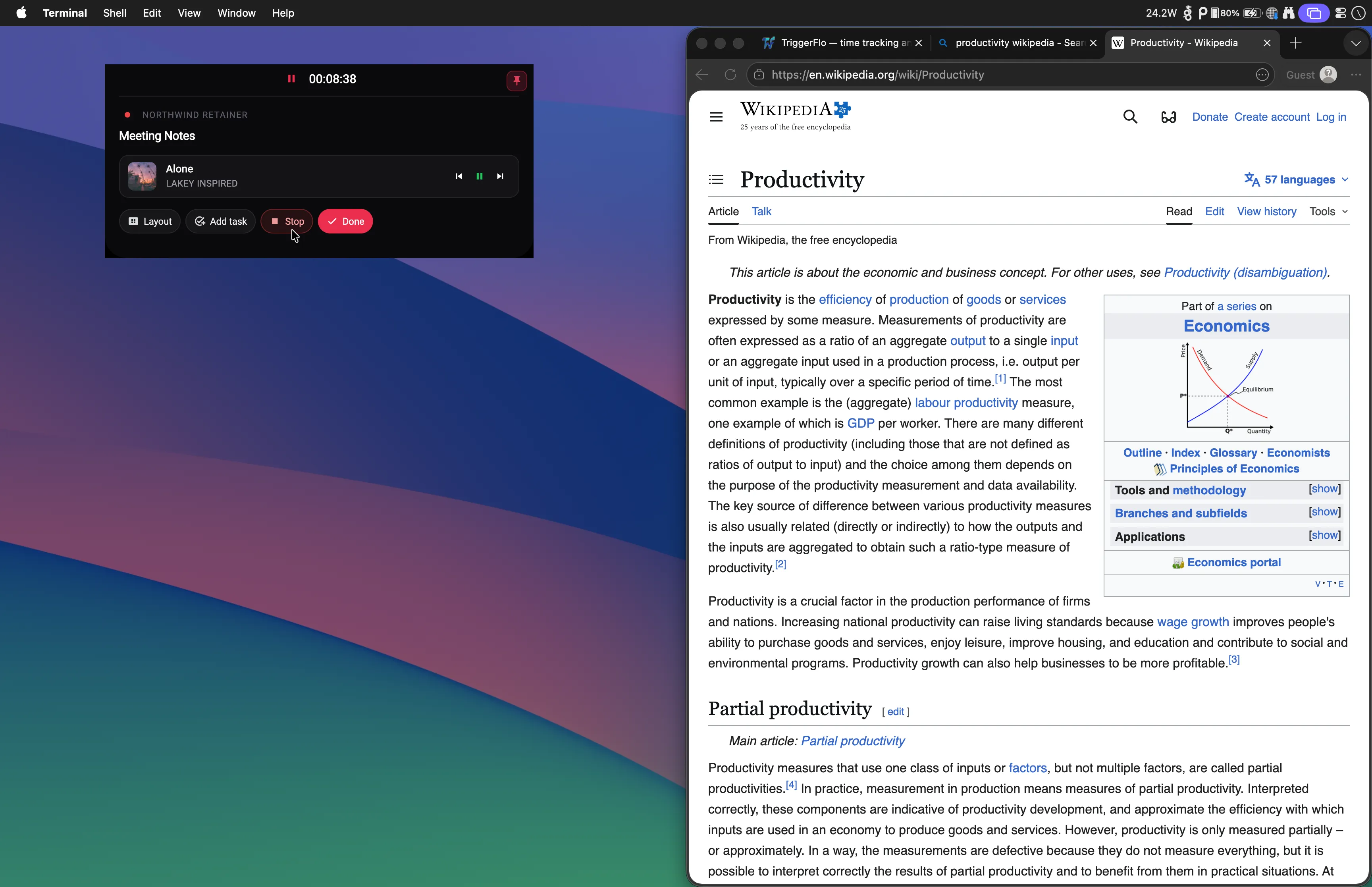
The TriggerFlo floating timer pinned above a browser window, tracking the task “Meeting Notes” with Spotify playback controls, while the user reads an article.

Projects

A board that tracks itself

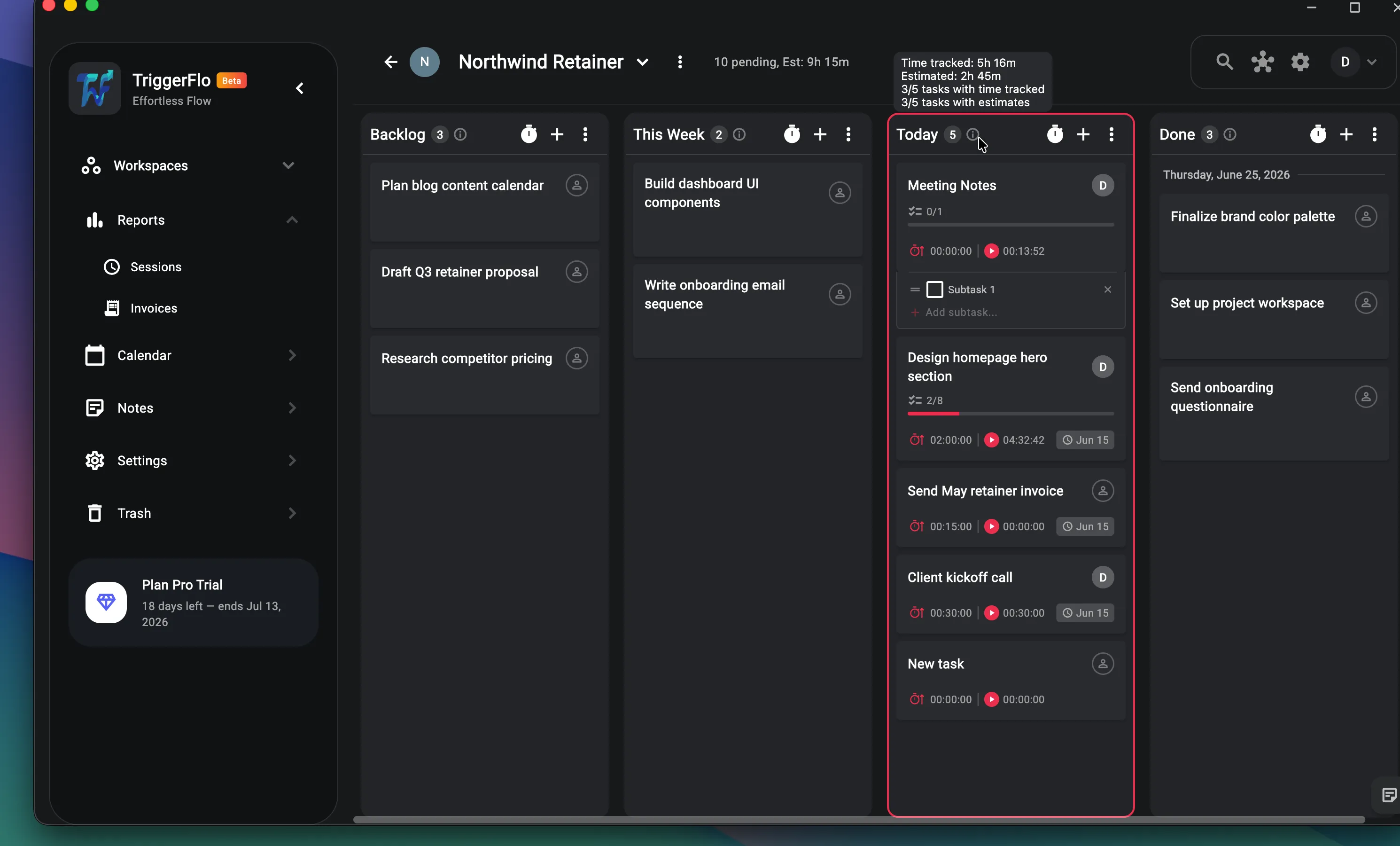
Drag tasks across columns like any Kanban board — except every card carries its estimate, its tracked time, and its due date. Hover a column and see exactly how much work is left in it.

  • Estimates and tracked time on every card
  • Subtasks with progress bars
  • Column automations: auto-tag, move tasks over, completion windows
TriggerFlo project board with Backlog, This Week, Today, and Done columns. Cards show estimates, tracked time, subtask progress, and due dates.

Reports · Invoices

Turn tracked time into an invoice

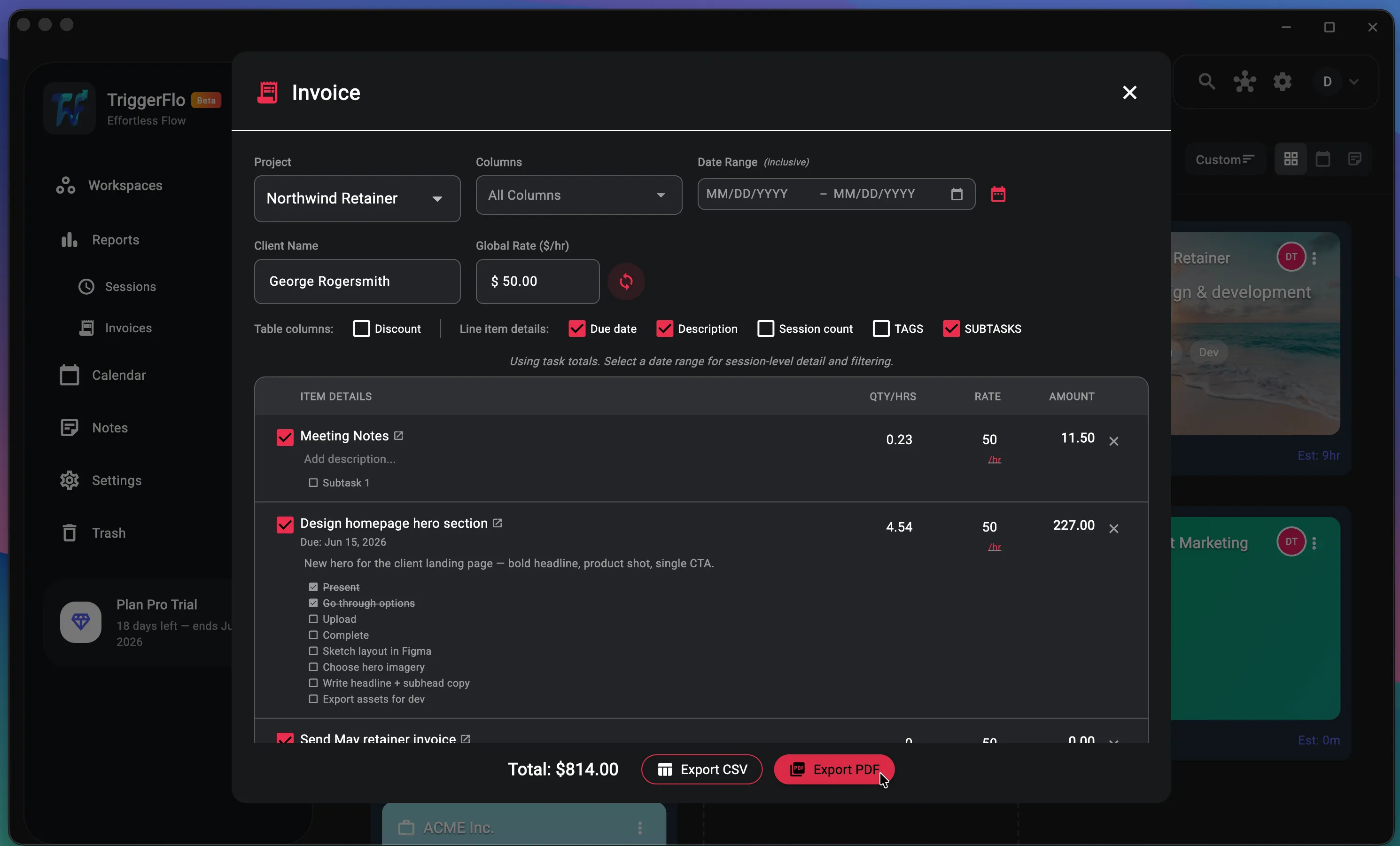
Pick a project, a client, and a rate — TriggerFlo builds the line items from the hours you actually tracked, down to the subtask. Trim what you don’t want to bill, then export a PDF or CSV.

  • Line items straight from tracked task totals
  • Per-line rates, discounts, and date-range filtering
  • Export to PDF or CSV
TriggerFlo invoice builder listing tracked tasks with hours, rates, and amounts, totaling $814.00, with PDF and CSV export buttons.

Calendar

See your month, schedule your week

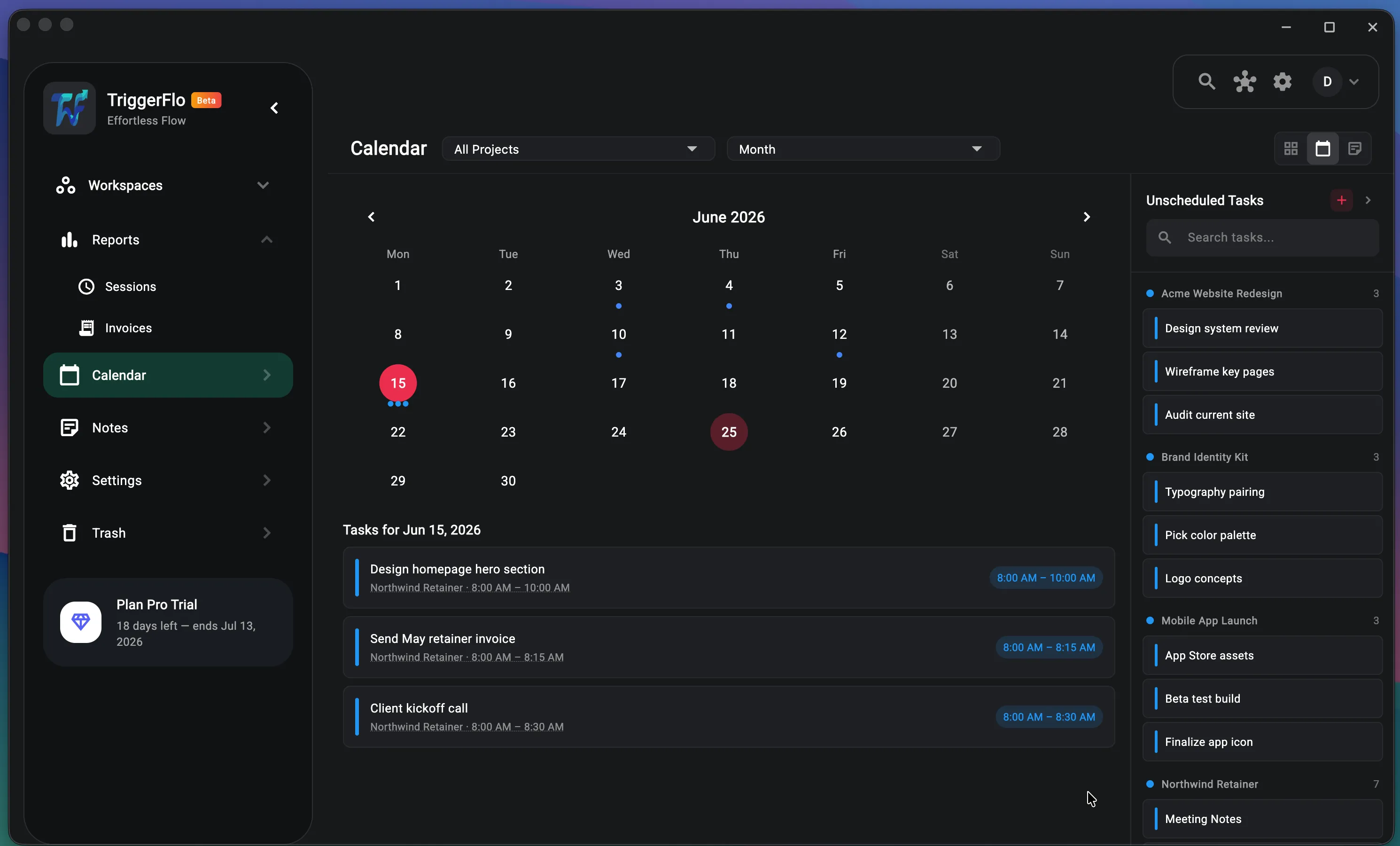
Every task with a date lands on the calendar, alongside your Google Calendar events. Unscheduled work waits in the side panel — drag it onto a day when you know when it will happen.

  • Month view across all projects, or one at a time
  • Unscheduled-tasks panel, grouped by project
  • Google Calendar import
TriggerFlo calendar in month view with scheduled tasks on June 15 and a side panel of unscheduled tasks grouped by project.

Teams

Share a board with your team — or the whole internet

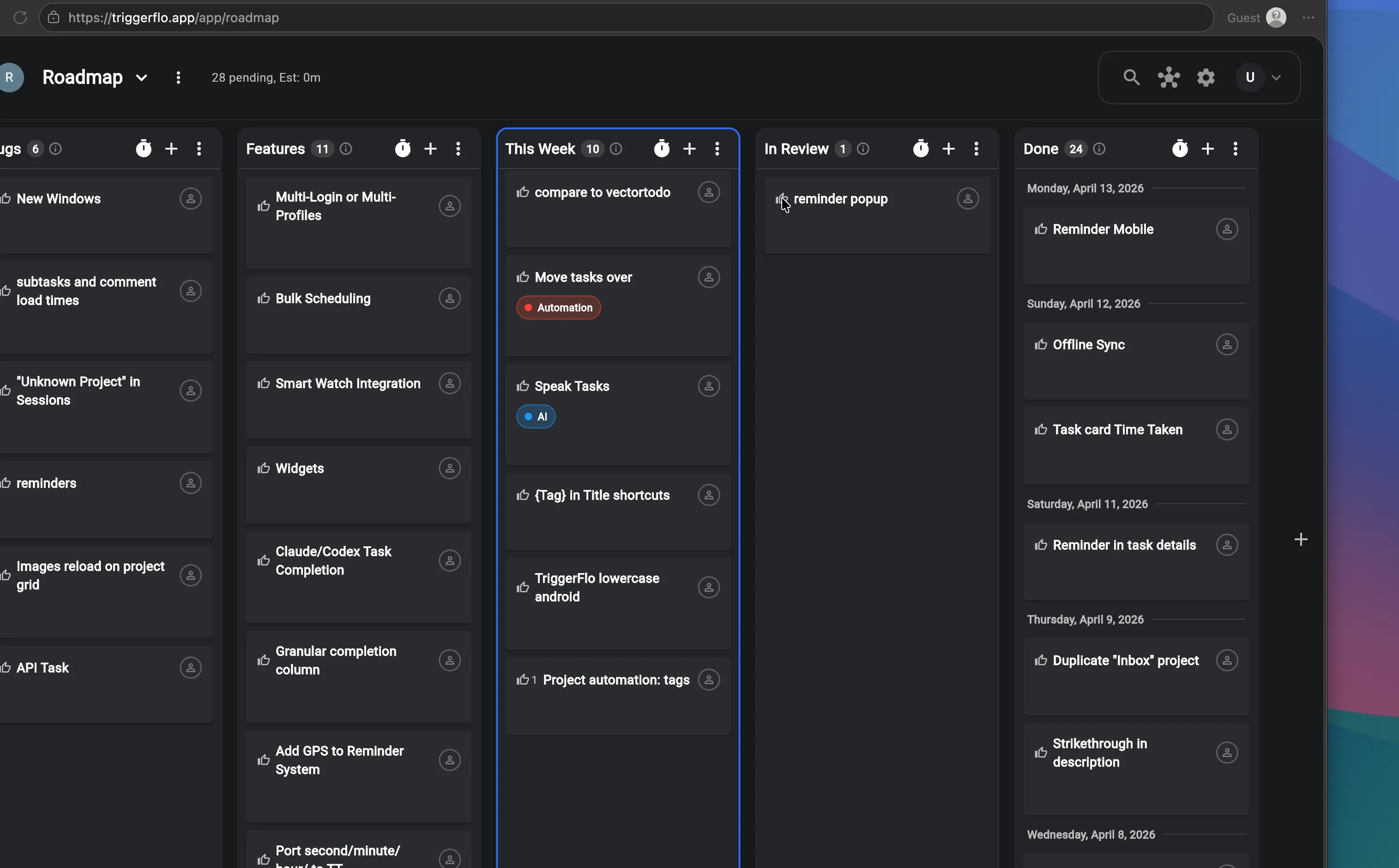
Invite teammates into a project and assign tasks, or publish a board as a public read-only page. Our own roadmap is a public TriggerFlo board where visitors upvote what we build next.

  • Invite teammates and assign tasks
  • Public boards on a shareable link — no account needed to view
  • Upvotes on public boards, like our live roadmap
The public TriggerFlo roadmap board viewed in a browser as a guest, with upvote buttons on feature cards across Bugs, Features, This Week, In Review, and Done columns.

Settings · Make it yours

Deep customization, not a settings graveyard

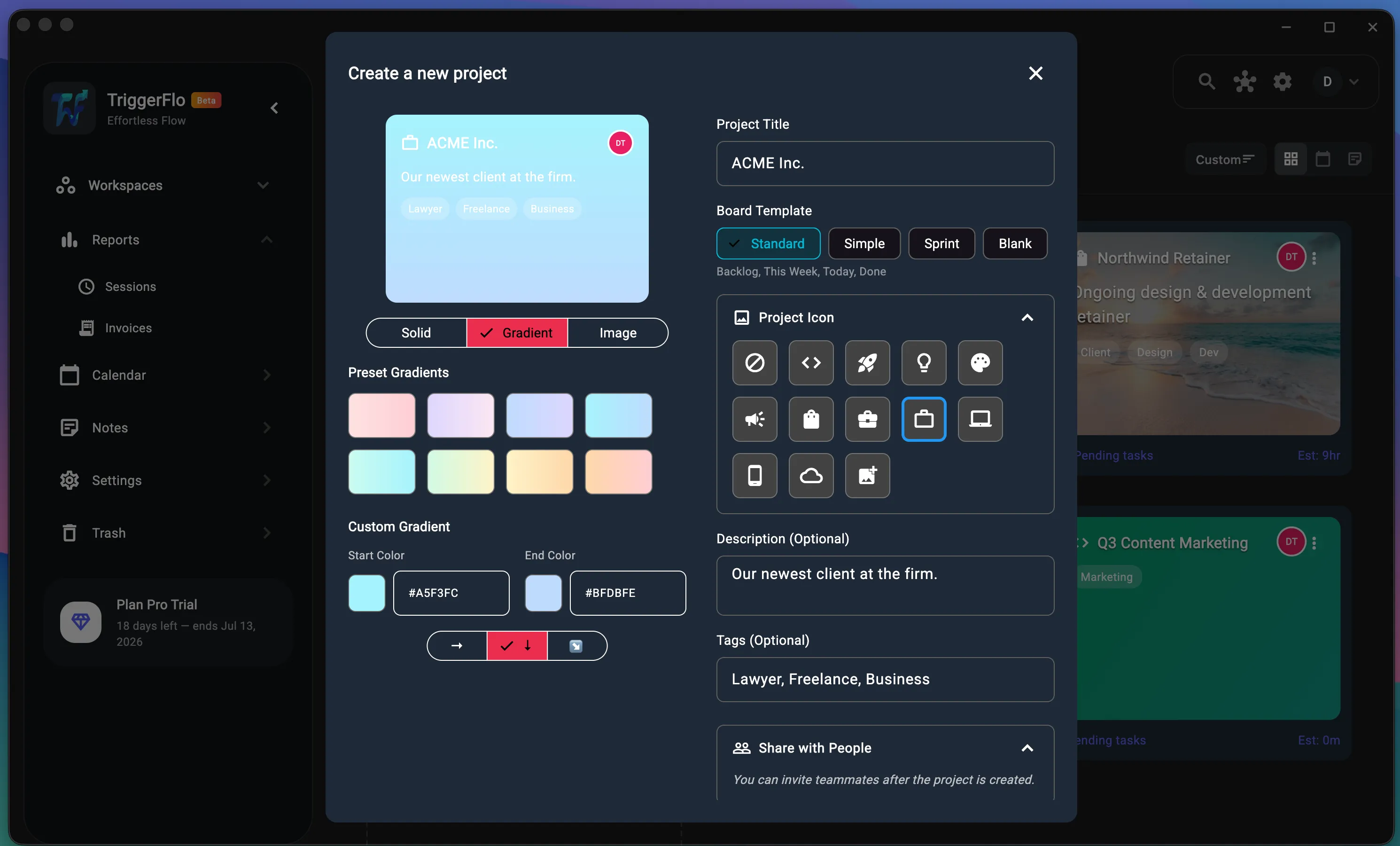
Give every project its own gradient, image, or icon. Reorder the timer’s buttons. Turn on a focus chime that rings a singing bowl every 20 minutes. The app bends to how you work, not the other way around.

  • Project covers: solid, gradient, or image, plus icons and tags
  • Board templates — Standard, Simple, Sprint, or Blank
  • Focus chime with Gentle Bell, Singing Bowl, and Soft Chime sounds
  • Reorderable timer controls, light and dark themes
TriggerFlo new-project dialog with gradient color pickers, project icon choices, board templates, tags, and sharing options.

One licence, every device

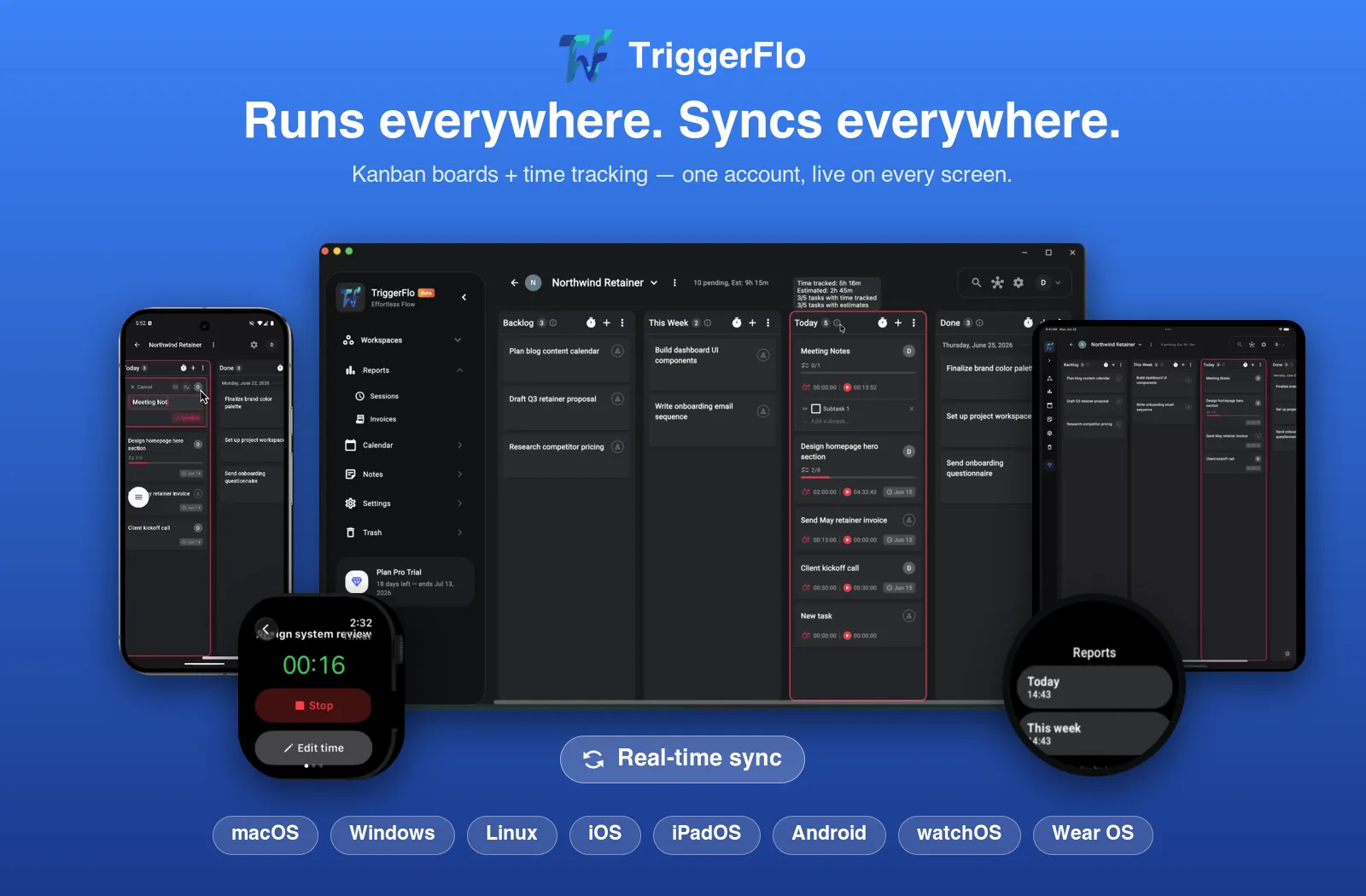
Mac, Windows, Linux, iPhone, Android, Watch, web

Native apps on all of them, syncing through one account. There is no per-device charge and no seat to add — Pro follows the account you activate.

TriggerFlo running on a Mac, a Windows laptop, an iPhone, an Android phone and an Apple Watch, all showing the same board and timer.

Try it, right here

Don't take our word for any of it

This is the real app compiled for the browser, running in a simulated desktop so you can watch the floating timer do the one thing a screenshot cannot show: stay on top of everything else. No account, no download, and nothing you type leaves your device.

A preview still of the TriggerFlo board, shown before the interactive demo is loaded.

Loads in this tab and takes a moment on a slow connection — it is the whole app. Best on a desktop-sized window.

Start a timer on any task to see it float above the other windows. Open it full screen ↗

Anything needing an account — sync, sharing, calendar, Spotify — is inactive in the preview, and the desktop app has timer layouts this only approximates.

From people already using it

Built for focus. Loved for it.

The floating timer that stays on top of everything is a game-changer. It actually tracks time linked to the task, so nothing gets lost. Turning tracked hours straight into an invoice without touching a spreadsheet is huge for freelance work. Syncs across phone, Mac, and web seamlessly.
I Itachi_7576 App Store review
Great app, great dev! It gets you into a state of flow to sit down, focus, and get all your tasks done. A productivity app that actually works, unlike the competition’s.
D Delta
Really liked this idea. Very versatile app — loved how efficient it is for team collaboration.
E Esportaa
I find the app really well-suited for improving productivity and having more control over the independent, freelance work you do.
DM Daniel Montes Translated from Spanish
The dev is v responsive and available, so any bug reports or feature reqs are promptly attended to.
C cryliomio App Store review

What the license gets you

Every platform

macOS, Windows, Linux, iPhone, Android, Wear OS and the web. Native apps, not a browser wrapper, and Linux ships x86_64 and ARM64 builds as .deb or tarball.

Tracker and board in one

Start the timer from the card you are working on. Tracked hours attach to the task and the client without you tagging anything.

Invoices from tracked time

Turn a month of hours into a client invoice inside the app. No CSV export and a spreadsheet in between.

Voice capture

Talk for thirty seconds about your week. It comes back as separate tasks with an urgency read and a due hint, shown to you before anything saves.

MCP server and REST API

Point Claude Code or any agent at your own board and let it read and file tasks while you work.

Every future update

Features shipped after you buy are included. The license does not expire and never renews.

Everything in Pro

  • Everything in Free
  • Unlimited Flo — your in-app AI assistant
  • Unlimited voice capture
  • Unlimited API keys — wire your board into Claude Code
  • Unlimited projects
  • Google Calendar & Spotify integrations
  • Publicly shared projects
  • Project sharing & email invitations
  • Team member role management
  • File uploads up to 50 MB
  • Invoice report generation
  • Priority support

The limits, up front

You have all been burned by a lifetime deal that turned out to mean something narrower than it said. Here is everything about this one that is smaller than our marketing copy, before you pay rather than after.

The AI features are capped

Our Pro plan is sold with unlimited AI. This deal gives you 300 assistant messages and 150 voice captures a month, because both cost us money on every call and there is no renewal paying for them. Everything else is uncapped: tracking, projects, boards, reports, sync, invoices, file uploads.

Voice capture is not on Linux

The platform has no speech recognition we can use, so the microphone does not appear there. On the web it works in Chrome and Edge only. Mac, Windows, iPhone and Android are all fine.

One license covers one person

You can share a board and set per-person permissions, from viewer up to owner. There is no team admin console and no pooled billing. Team plans are on the roadmap and are not part of this deal.

Calendar and Spotify need your own accounts

Google Calendar sync and Spotify playback connect to services you already pay for. We do not resell either.

Activate on web or desktop, not mobile

Apple and Google require in-app purchases to go through them, so the iPhone and Android apps have no license-key screen. Activate once in the web or desktop app and every other device picks it up from your account.

How to redeem it

  1. 1

    Buy through the link on this page. Stripe emails you a license key that looks like TFLO-XXXX-XXXX-XXXX.

  2. 2

    Make a free account at triggerflo.app/app, or in the desktop app, using the same email address you paid with. The key is tied to that address.

  3. 3

    Open the account menu at the top right, choose Activate Pro, and paste the key.

  4. 4

    Sign in on your phone and watch with the same account. Pro follows the account, so there is nothing to activate twice.

Questions worth asking before you buy

Can I try it before I buy?

Yes, and without giving us anything. The preview further up this page is the real app compiled for the browser — no account, no download, and nothing you type in it leaves your device. The free tier of the actual app is also permanent: three projects, time tracking, the board and the floating timer, no card required. Buy the deal when you already know you want it.

What does "lifetime" actually mean here?

One payment of $59 for a Pro license that never expires and never renews. Every feature we ship after you buy is included, and cloud sync across your devices is part of it rather than billed separately.

Why is this cheaper than your own website?

Our lifetime license is $119 on triggerflo.app, and no public discount code applies to it. $59 is 50% off that, for your community, for this window only. Go and check the pricing page — the comparison is meant to survive it.

What happens when the window closes?

The KENMOO code stops working on October 21 and the lifetime license goes back to $119. Licenses already bought are unaffected, forever.

Can I buy one as a gift, or a second for someone else?

Yes, but put THEIR email in the Stripe checkout, not yours. Each key is tied to the email it was bought with and can only be activated by an account using that address, so a key bought under your own email cannot be handed on afterwards. Buy it with their address and the key goes straight to them.

What is your refund policy?

60 days, no questions, for anyone buying through this deal. Our standard policy is 14 days. Email [email protected].

What if I hit the AI caps?

The rest of the app keeps working. The caps only apply to the assistant and voice capture, and they reset every month. If 300 messages a month is genuinely not enough for you, email us and we will work something out rather than have you feel cheated.

Is my data locked in?

No. The desktop app keeps a local SQLite database on your own machine, and you can export everything to CSV at any time. A lifetime license has nothing to cancel, so there is no hostage situation by design.

Who builds this?

One person. That means you get answers from whoever wrote the code, and it means honest limits rather than a roadmap that promises everything. There is no team admin console, no Gantt charts, and no employee screenshot surveillance, which we will not build at any price.

$59 once, and never again

60 days to change your mind. If it is not for you, say so and we will refund you without a survey.

Get it for $59

Code KENMOO · closes October 21

Not ready today?

Leave your email and we will send one reminder before the KENMOO code stops working on October 21, plus release notes as we ship. No spam, unsubscribe any time.

TriggerFlo Pro lifetime — $59 once, was $119

Code KENMOO · closes October 21 · 60-day refund

Get it for $59