Windows 10 and 11 · 64-bit

A Windows time tracker with the board built in

TriggerFlo for Windows is a native app: a Kanban board, an always-on-top floating timer that stays above Teams and your IDE, a system-tray icon and global hotkeys. One app instead of a tracker plus a project tool.

Windows 10 (64-bit) or later. Free up to 3 projects, no credit card.

Two ways to install

The Microsoft Store build updates itself through Windows. The installer is a direct download for machines that cannot reach the Store. Same app either way.

Requires Windows 10 (64-bit) or later. Windows 11 supported.
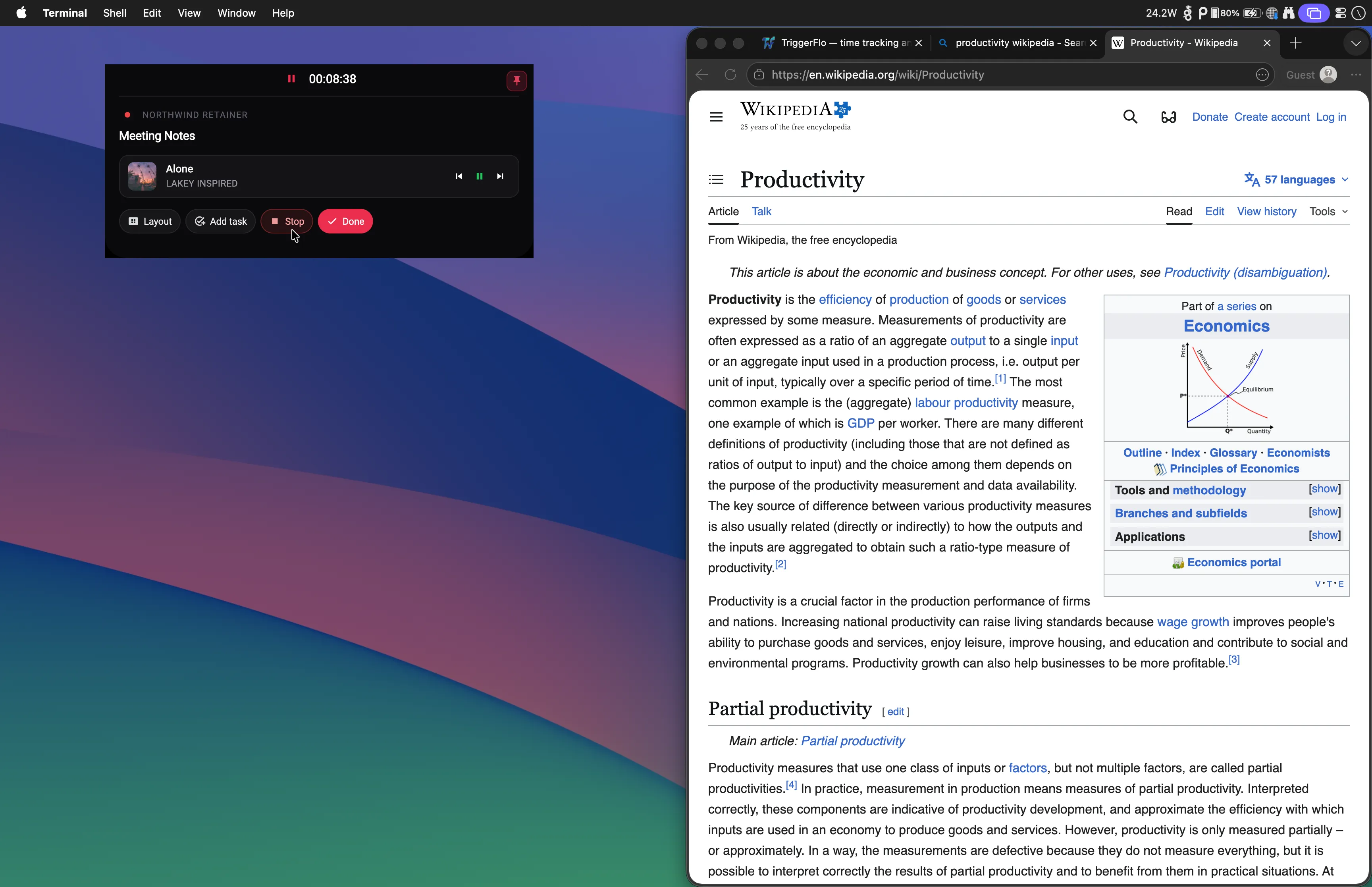
The TriggerFlo floating timer staying on top of another Windows application while a task is being tracked.

Behaves like a Windows app

Tray, hotkeys, autostart, and a window manager that understands always-on-top — the things a browser tab cannot do.

More on the always-on-top floating timer and its four layouts →

One app, not two

The tracker and the plan in one window

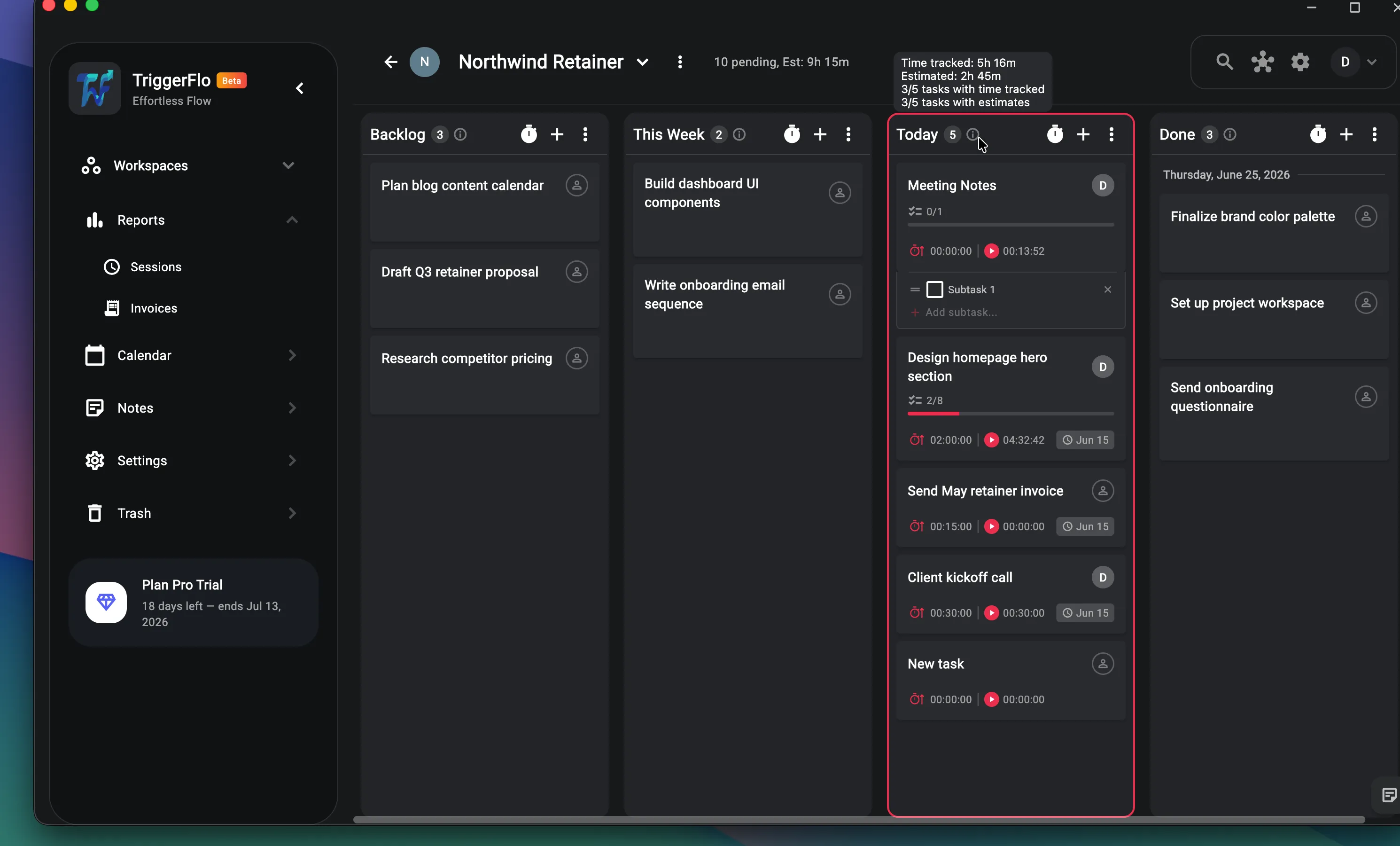
Most Windows time trackers stop at the stopwatch, and the work itself lives in a second subscription — Toggl Plan next to Toggl Track, Plaky next to Clockify. TriggerFlo puts the board in the same app, so a card shows what you estimated and what it really took without an integration in the middle.

TriggerFlo project board on Windows with Backlog, This Week, Today and Done columns, each card showing estimate and tracked time.

Windows questions

Microsoft Store or the .exe installer?

Both are the same app. The Microsoft Store build updates itself through Windows and installs without any prompts; the .exe is a direct download for people who prefer to keep their installs off the Store, or who cannot reach it on a managed machine.

Which versions of Windows are supported?

Windows 10 64-bit and later, which includes Windows 11. There is no 32-bit build.

Do I need administrator rights to install it?

The Microsoft Store version installs without admin rights. The .exe installer may prompt depending on where you install it and how your machine is managed.

Does it work offline?

TriggerFlo keeps a local SQLite database on your PC and syncs it to your account, so a dropped connection while a timer runs is not a problem. A full offline mode is in progress rather than finished, so a permanently disconnected machine is not the setup it is built for today.

Is it Electron? Will it eat my RAM?

It is not Electron. TriggerFlo is a Flutter app compiled to a native Windows binary, which is why it can sit in the tray all day with a timer running without behaving like a second browser.

How does it compare to Toggl Track or Clockify on Windows?

All three have real Windows desktop apps, so the differences are elsewhere: TriggerFlo puts the Kanban board and the timer in one app rather than two products, and charges a flat price — Pro at $5.99 a month or $119 once — instead of a per-user-per-month seat fee.

Free on Windows, and free to stay that way

Up to 3 projects free. Pro is $45.99 a year, or $119 once for a lifetime license.

Also on Mac, Linux, iOS, Android and the web — same account, same projects.

Get release notes in your inbox

New features and fixes as they ship on desktop and mobile. No spam, unsubscribe any time.