Comparison · TriggerFlo vs Toggl Track

A Toggl Track alternative with the board built in

Toggl Track is an excellent timer. TriggerFlo is a timer and a Kanban board in one native app, at a flat price instead of a per-seat one — with a lifetime license if you would rather stop renting software.

Free forever up to 3 projects. Pro $45.99/yr, or $119 once. Mac, Windows, Linux, iOS, Android.

The short version

$108

Toggl Track Starter, one person, one year ($9/user/mo, billed annually). TriggerFlo Pro is $45.99 — or $119 once, forever.

2 apps

Toggl Track for time, Toggl Plan for planning — billed separately. TriggerFlo is one app with the board and the timer in the same window.

Linux

Toggl retired its Linux desktop app. TriggerFlo ships .deb and .tar.gz builds for x86_64 and ARM64, Raspberry Pi included.

TriggerFlo vs Toggl Track, feature by feature

A mature, well-liked time tracker built around one-click timers, a big integration ecosystem, and reporting for agencies and consultancies that bill by the hour.

Price for one person, year one

TriggerFlo
Yes. $45.99/yr, or $119 once for lifetime
Toggl Track
Partly. $108/yr on Starter ($9/user/mo, annual)

Free plan

TriggerFlo
Yes. Free forever, up to 3 projects, unlimited tracking
Toggl Track
Yes. Free forever, up to 5 users, unlimited tracking

One-time purchase option

Pay once, own it

TriggerFlo
Yes. Lifetime license, $119
Toggl Track
No. Subscription only

Kanban board in the same app

Tasks, columns, drag and drop

TriggerFlo
Yes. Board and timer are one product
Toggl Track
No. Planning lives in Toggl Plan, billed separately

Always-on-top floating timer

TriggerFlo
Yes. Four layouts, stays above other windows
Toggl Track
Partly. Mini timer widget in the desktop app

Native Linux desktop app

TriggerFlo
Yes. .deb and .tar.gz, x86_64 and ARM64
Toggl Track
No. Linux desktop app was retired; web app only

Invoices from tracked time

TriggerFlo
Yes. Built in on Pro, PDF and CSV
Toggl Track
Partly. Billable rates and reports; invoicing via integrations

Smartwatch app

TriggerFlo
Yes. Apple Watch and Wear OS
Toggl Track
Partly. Mobile apps; no first-party watch app

Music that starts with your timer

TriggerFlo
Yes. Spotify playback tied to the timer
Toggl Track
No. Not a feature

Integration catalogue

Jira, Asana, GitHub, and the rest

TriggerFlo
Partly. REST API, Google Calendar, Spotify
Toggl Track
Yes. 100+ tools via the browser extension

Team administration

SSO, audit trails, org-wide policy

TriggerFlo
Partly. Roles and invitations; dedicated team plans in progress
Toggl Track
Yes. SSO and admin controls on Premium and Enterprise

Difference 1

Toggl splits tracking and planning into two products

Toggl Track times your work. Toggl Plan schedules it. They are separate purchases with separate subscriptions, and the connection between "what I planned" and "what it actually took" is a report you assemble yourself. TriggerFlo has one board where each card carries its estimate and its tracked time side by side — the variance is just visible.
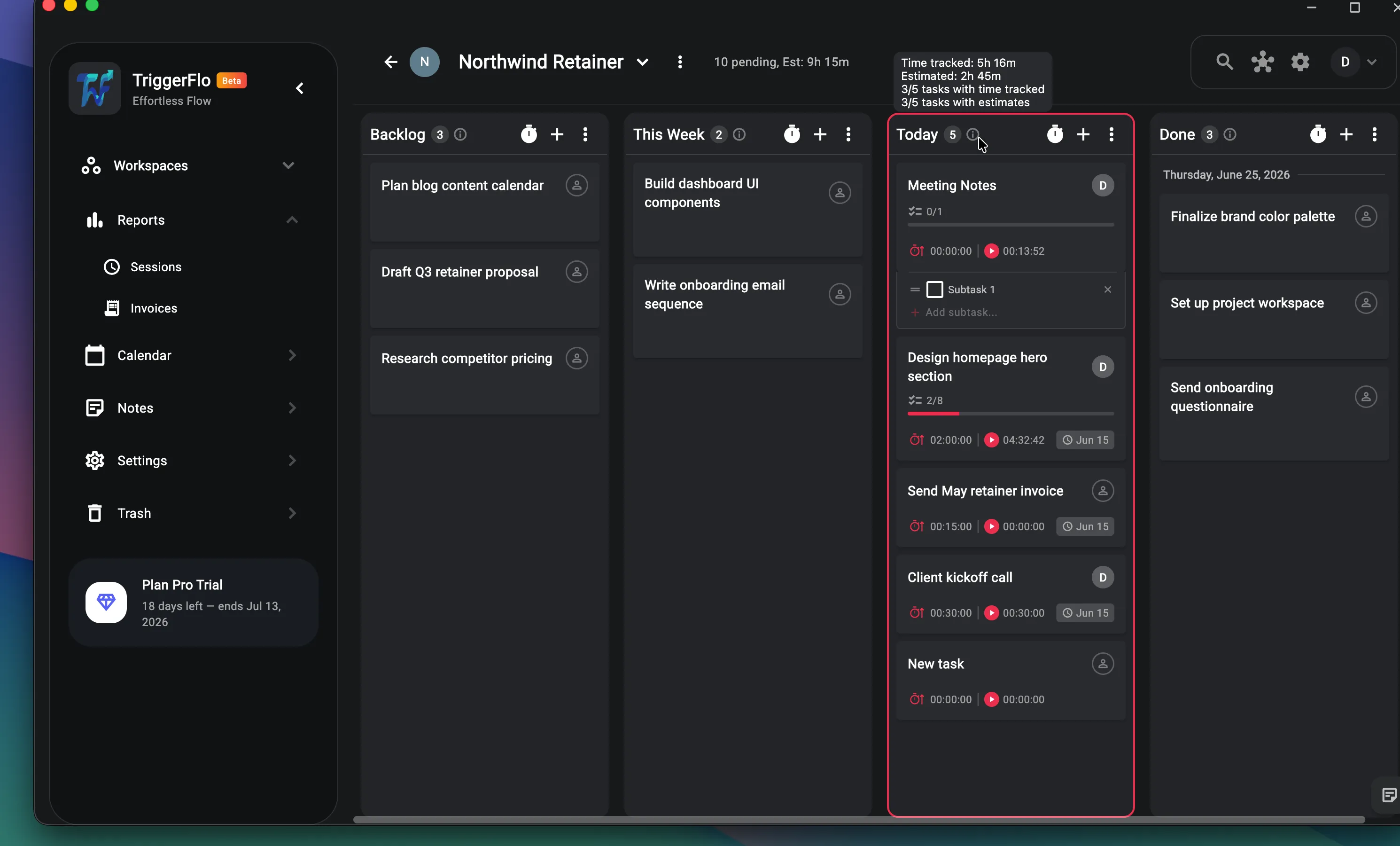
TriggerFlo project board showing cards with estimates, tracked time, subtask progress and due dates.

Difference 2

A timer that stays in front of you

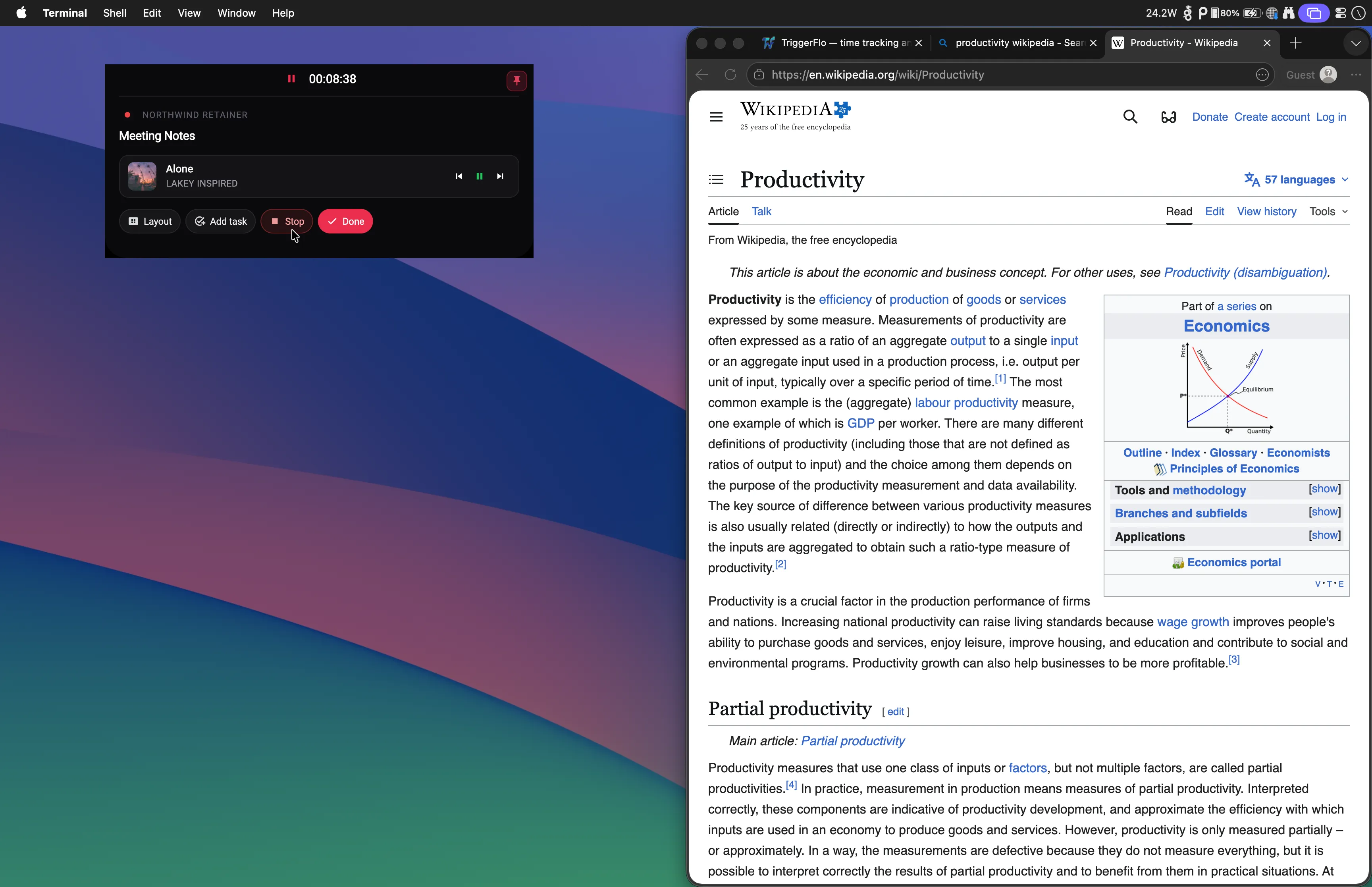
Toggl Track’s desktop app gives you a mini timer window. TriggerFlo’s floating timer is a always-on-top window with four layouts — Small, Island, Compressed and Expanded — that sits over whatever you are working in, shows the task you are on, and takes a click to switch. The reason people forget to track is that the tracker is behind three other windows.

The TriggerFlo floating timer running above another application, showing the current task and elapsed time.

Which one should you actually pick?

Toggl Track is a good product. Here is the honest split — the cases where it is the right call, and the cases where TriggerFlo is.

Choose Toggl Track if…

  • You live inside other tools all day

    Toggl Track’s browser extension puts a start button inside Jira, Asana, GitHub, Notion and roughly a hundred other apps. If your work already has a home and you just want a timer bolted onto it, that catalogue is the single strongest reason to pick Toggl — TriggerFlo has a REST API and a handful of first-party integrations, not an ecosystem.

  • You are buying for a real team with real IT requirements

    SSO, granular admin controls, and a decade of enterprise deployments behind them. TriggerFlo has project roles and email invitations today, and dedicated team plans are still in progress. If procurement is involved, Toggl is the safer answer.

  • Your free team is under five people

    Toggl’s free plan covers five users with unlimited tracking. TriggerFlo’s free plan is generous per person but caps you at three projects. For a tiny team that tracks a lot of projects and needs nothing else, Toggl free may simply go further.

Choose TriggerFlo if…

  • The board and the timer are the same app

    In the Toggl world, tracking is Toggl Track and planning is Toggl Plan — two products, two subscriptions. In TriggerFlo, every card on the Kanban board carries its own estimate and its own tracked time, because the tracker and the board were built as one thing.

  • A flat price instead of a per-seat meter

    TriggerFlo Pro is $5.99 a month, $45.99 a year, or $119 once. Toggl Starter is $9 per user per month — $108 a year for one person, and it multiplies from there.

  • You can stop renting it

    The lifetime license is a one-time payment that includes future updates. There is no equivalent anywhere in Toggl’s pricing.

  • Linux is a first-class platform

    Toggl retired its Linux desktop app; Linux users get the web app or a community-built client. TriggerFlo ships signed .deb and .tar.gz builds for x86_64 and ARM64, including Raspberry Pi.

TriggerFlo vs Toggl Track — common questions

Is TriggerFlo a drop-in replacement for Toggl Track?

For solo work and small teams, yes — timers, projects, tags, reports, billable rates and CSV export all have equivalents. Where it is not a drop-in: Toggl’s browser extension puts start buttons inside 100+ other tools, and TriggerFlo does not have that catalogue. If your tracking habit depends on starting timers from inside Jira or Asana, check the API docs before you switch.

Can I import my Toggl data?

Export your time entries from Toggl as CSV, then email [email protected] and we will help you get them in. There is no one-click importer yet.

How much cheaper is TriggerFlo, really?

For one person: $45.99 a year against $108 a year on Toggl Starter. The lifetime license at $119 costs about thirteen months of Toggl Starter, and then never bills again.

Does TriggerFlo work on Linux?

Yes — native .deb and .tar.gz builds for both x86_64 and ARM64, plus the web app. Toggl’s Linux desktop app is no longer maintained.

Toggl Track pricing and features on this page were checked on August 24, 2026 against Toggl Track pricing , Toggl Track apps . Plans change; check their site for today's numbers. Spotted something out of date? Tell us at [email protected] and we will fix it. TriggerFlo is not affiliated with or endorsed by Toggl Track.

Try it against your own week

Free up to 3 projects, no credit card. Run it alongside Toggl for a week and keep whichever one you actually open.

Get release notes in your inbox

New features and fixes as they ship on desktop and mobile. No spam, unsubscribe any time.